



Hold onto the moments.
Not every little detail.
A free baby tracker for iPhone, with feeds, sleep, diapers, growth and milestones in one calm, pastel interface. No ads. Pro adds Apple Watch logging and encrypted family sharing.
- Free baby logging
- No account for free logging
- Private by default
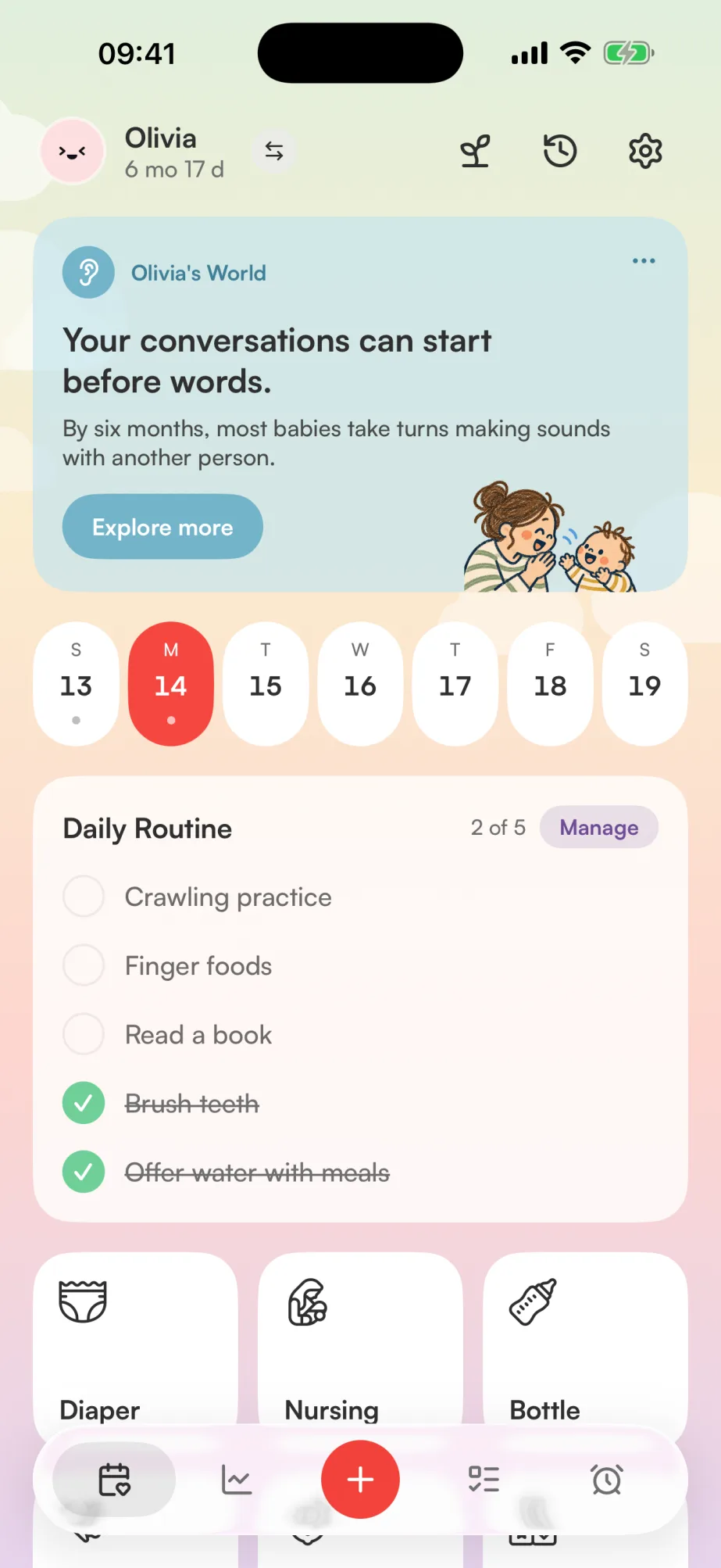
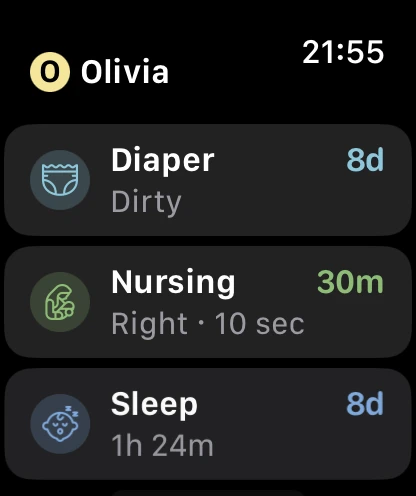
Feeds, sleep, diapers and more
Keep feeding, sleep, diaper changes, activities, growth, health and milestones in the same app.
Feeding
- Bottle & Nursing Breast milk or formula, left/right timers.
- Solids Log meals and the foods your baby tries.
- Pumping Separate left/right sides and volumes.
- Milk Stash Pro: fridge and freezer batches, bottle deductions and printable QR labels.
Activity
- Diapers Wet, dirty, mixed or clean, in one tap.
- Sleep Naps and nights with a live timer.
- Potty Potty-training trips, logged in a tap.
- Brush Teeth Morning and night, checked off.
- Tummy Time Record tummy time sessions and their duration.
- Play Time Indoor & outdoor games and play.
- Reading Log reading sessions. Pro adds book barcode scanning.
- Screen Time Track how long screen-time sessions last.
Growth
- Growth Charts WHO charts for weight, length and head circumference.
- Day Rhythm Pro: compare days on a 24-hour timeline.
Health
- Vaccines The childhood schedule, kept on record.
- Health Temperature, medications and illnesses.
- Baby Card Pro: a printable summary for an appointment.
Milestones
- First Step Save the date of their first steps.
- Sat Down Sitting up all on their own.
- First Word Save their first word and when they said it.
- First Tooth Save when their first tooth appeared.
Lists & More
- Daily Checklist Vitamin D, tummy time, whatever matters.
- Local Photos Attach photos to entries. Kept on this phone; no photo sync or sharing.
- Reminders Pro: at a set time, or after the last logged feed.
- Photo Logging Pro: snap a reading and Plumi fills in the entry.
The day's rhythm, at a glance
With Plumi Pro, see each day on a 24-hour timeline, with sleep and feeds lined up across days. Filter by activity or check 14-day trends. More about Rhythm insights
An estimate for the next nap
With Plumi Pro, see estimated nap and bedtime windows based on age guidance and recent sleep logs. How Sleep Forecast works
Growth, charted clearly
Add weight, length and head circumference measurements to WHO growth charts. Plumi calculates the percentiles on your phone. More about the growth tracker
Know what to look for, month by month
Browse milestone guidance from 2 months to 5 years, organized by development area. The guide uses CDC and American Academy of Pediatrics sources and is free without an account.
What many children do by 6 months
Use this guide to discuss your child's development with their pediatrician.
Social and emotional


Less typing for everyday logs
Choose a recent food instead of typing it again, or select ‘Now’ or ‘5 min ago’ for the time. For strolls, Plumi can use your location, with your permission, to fill in the place name.
Record foods and reactions
When it's safe to do so, record the food, symptoms and severity of a possible reaction. Keep the details on the Care tab and share the list with caregivers or your pediatrician. A log cannot diagnose an allergy. More about the allergy tracker
Story time, scanned in
Log reading sessions and choose from recent books. With Plumi Pro, scan a barcode to find the title and cover through Google Books or Open Library.
Log it with a photo
With Plumi Pro, hold + and snap a thermometer, a scale, a bottle, a plate of food or a book cover. Plumi fills in the entry, and you check it before it's saved. Apple Private Cloud Compute reads the photo without keeping it, and it's never sent to our servers. Needs iOS 27 with Apple Intelligence. Everything a photo can log
Your whole day, in one place
The journal shows each entry with its start and end time, plus your daily totals. Tap a category to see just those logs with the time between them, like how long it's been since the last feed or how long your baby was awake. Add care tasks to the daily routine, with reminders available in Plumi Pro. More about the diaper tracker
Just suggestions, not medical advice. Ask your pediatrician about your baby's routine.
Reminders based on time or your last log
With Plumi Pro, set a reminder for a fixed time or an interval after the last feed, pumping session or medication entry. Choose a template or add a reminder to a routine item. More about baby reminders
Your milk stash, easy to keep track of
With Plumi Pro, see your fridge and freezer totals, find the oldest batches first and spot those marked “to use soon.” Choose where milk is stored when logging pumping and deduct bottles from the stash. Print QR batch labels on A4 sticker sheets or plain paper, then scan a bag with your iPhone camera to log a bottle from it, with its remaining amount already filled in. How Milk Stash works
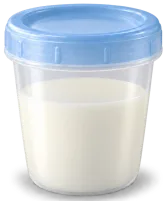 25 ml 13 minutes Use by Fri, Oct 9 60 ml 1 minute Use by Mon, Oct 12 60 ml 10h frozen Best by Apr 8 80 ml 8h frozen Best by Apr 8 20 ml 7h frozen Best by Apr 8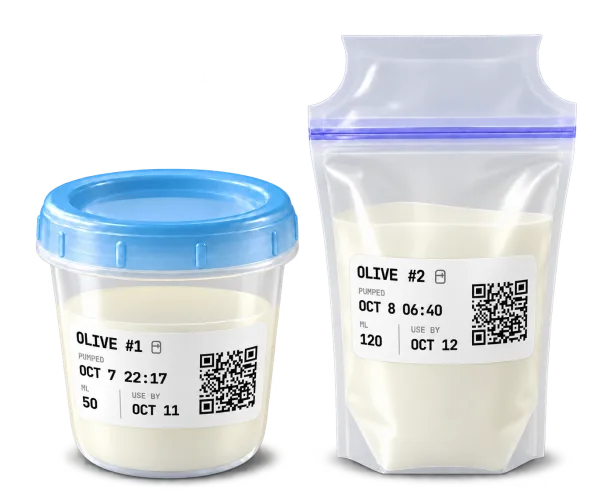
Keep track when your hands are full
With Plumi Pro, ask Siri to start any timer, log a bottle or diaper, or check the last feed or diaper. Stopping a timer works without Pro too. Siri asks for the bottle amount or diaper type, so you can log from your iPhone, AirPods or Apple Watch without opening Plumi.
 Hands-free, from anywhere. Say Hey Siri, and Plumi logs without you opening the app. “Hey Siri, start sleep timer in Plumi” “Hey Siri, stop nursing in Plumi” “Hey Siri, log diaper in Plumi” Siri asks wet, dirty or mixed. “Hey Siri, log bottle in Plumi” Siri asks the amount. “Hey Siri, last feed in Plumi”
 Your baby's day, a glance away
See today's feeds, bottle volume, diapers and total sleep without opening the app. Home Screen widgets show your baby's name, and Plumi Pro adds live timers, quick-log favorites and the next-nap forecast. See all widgets and controls
Timers that live on your Lock Screen
With Plumi Pro, sleep, nursing and other activity timers appear on your Lock Screen and Dynamic Island. Check the duration and stop the timer without unlocking.
- Sleep
- Nursing
- Stroll
- Bathing
- Tummy time
- Play
- Story time
- Screen time
Share with whoever's holding the baby
With Plumi Pro, invite a partner or caregiver and choose which children to share. Select one parent or caregiver role for the invitation. Each entry shows who logged it, and shared care records are end-to-end encrypted. Learn more about family sharing
One card for the doctor's visit
With Plumi Pro, the Baby Card combines growth measurements, 30-day care averages and recent health entries in a printable PDF. Choose A4 or US Letter for the appointment.
Averages over 30 days · Generated by Plumi
Reports, kept with the visit
Scan the lab report or prescription right at the clinic, and it stays attached to that visit's entry, not lost in your camera roll. Doctor's visits, vaccines, medications, fevers: any health entry can carry its paperwork. Documents stay on your iPhone and in your own iCloud backup, never on Plumi's servers. Part of Plumi Pro.
Plumi speaks your language
Use Plumi in English, German, Spanish, French, Japanese, Brazilian Portuguese or Turkish.
- English English
- Deutsch German
- Español Spanish
- Français French
- 日本語 Japanese
- Português Brazilian Portuguese
- Türkçe Turkish
Your care records stay privateOn your phone, with optional encrypted Pro sync
- Private by default No account needed to start, and even Pro sync is end-to-end encrypted, so we can’t read it.
- Works offline Keep logging offline. If Pro sync is enabled, entries sync when you reconnect.
- Export anytime Download your whole history as CSV to share with your pediatrician.
- iCloud backup Back up your records to iCloud Drive and restore them on a new phone.
Start tracking for free
Baby logging is free for one child, with the latest month of journal history visible. Growth and milestones stay visible. Pro adds full history, sleep insights, sharing and more, for $2.50/month billed annually ($29.99/year), or $4.99/month. Prices shown are in US dollars; your App Store shows local pricing.
Free
Baby care logging for one child.
- Log diapers, feeds, pump, sleep & more
- Growth charts with WHO percentile curves
- Daily routine checklists
- Photo attachments, stored on your phone
- Vaccine schedule & milestones
- Dark mode
- CSV export & optional iCloud backup
- Last month of logs visible; growth and milestones stay visible
- Works fully offline, no account or ads
- View recent care on Apple Watch
Pro
Sync, family sharing and more than one baby.
billed as $29.99/year · 3-day free trial
- Everything in Free
- View your full log history
- Sync across all your devices
- Share with your partner or caregivers, end-to-end encrypted
- Multiple baby profiles
- Scheduled and follow-up reminders
- Live Activities on your Lock Screen & Dynamic Island
- Book barcode scanning
- Scan & attach documents to health entries
- Baby Card: a printable doctor summary
- Sleep Forecast, Sleep Plan & Rhythm insights
- Apple Watch logging & timers
- Milk Stash: fridge, freezer & printable QR labels
- Siri: timers, bottle & diaper logs, recent care
US dollar prices. Your App Store shows local pricing and eligibility for the 3-day trial before purchase. Subscriptions renew automatically unless cancelled in the App Store.
Choosing a baby tracker?
See how Plumi compares with ten familiar baby tracking apps.
Notes for new parents
What to try when your baby hates bath time
Baby cries at bath time? Try a calmer time of day, a shorter wash or a sponge bath. Practical tips on warmth, washing and keeping your baby safe.
How to organize and track your breast milk stash
Keep your breast milk stash organized with storage times, labeling tips and a simple rotation system. Meet Milk Stash in Plumi for fridge and freezer tracking.
Returning to work after a baby
A practical plan for the first week back after parental leave, from a practice morning and pickup arrangements to updates that let you get on with your day.
Questions before you choose a baby tracker
Is Plumi a free baby tracker without ads?
Yes. Track one baby’s feeds, sleep, diapers, pumping, growth, health and milestones for free, with no ads or account required. Free shows the latest month of journal history; older logs stay stored and remain in CSV exports and backups. Growth and saved milestones keep their full history. Plumi Pro adds full journal history, sharing, Apple Watch logging and other extras.
Does Plumi work on Apple Watch?
Yes. View recent care on Apple Watch for free. Plumi Pro adds nursing and sleep timers, other activity timers, and diaper, potty and tooth-brushing logs. Bottle amounts, pumping volumes and foods are entered on iPhone. You need a paired iPhone and watchOS 11 or later. See the Apple Watch guide for setup and plan details.
Can my partner, grandparents and nanny share the same baby tracker?
Yes. Plumi Pro sharing supports up to five people per child, including the sharing owner. Each person uses their own account on iPhone. Choose which children to share and a parent or caregiver role. One subscription covers the invited family; updates sync when connected. Photos and scanned documents stay on the device that added them.
Can I use Plumi offline without creating an account?
Yes. Everyday tracking works offline on your iPhone without a Plumi account. Pro sync and sharing need an internet connection to exchange updates. Book lookup, sign-in and purchases also need a connection. Read where your baby’s data goes for the difference between local tracking, backup and encrypted sync.
Is Plumi simple enough to use with a newborn?
Start with the logs you need: breastfeeding and bottles, diapers, and sleep. Choose and reorder the quick actions on Today, use a timer or enter times afterward, and check daily totals. All these log types are free. Growth, health and milestones are there when you need them.
What does Plumi’s interface look like?
Plumi uses soft pastel category colors, illustrated activity cards, large controls and a light or dark appearance. The Plumi homepage shows screenshots of the actual app, and you can read about the design choices for one-handed logging. Try the free app to see whether it feels right for you.
Can I track breastfeeding, bottles and sleep in one app?
Yes. Nursing records left and right sides and duration; bottles use ml or oz, and sleep entries record start and end times. Daily totals bring them together with diapers, pumping, health and other care. See every log type. Pro adds Rhythm insights and Sleep Forecast; basic logging and in-app timers are free.

Keep track of your baby's day
Log feeds, sleep, diapers and more for free. No account needed to start.