


 Sleep tracker
 A baby sleep tracker that shows the pattern
Start a timer when your baby falls asleep and stop it when they wake. Check nap durations and daily sleep totals. Pro insights can help you plan the stroll, the shower, and your own nap around your baby’s sleep.
- Sleep timers Start a timer in the app, or add a sleep afterward. With Plumi Pro, check and stop the timer from your Lock Screen.
- Compare sleep across days With Plumi Pro, line up daily sleep and feeding logs in Rhythm and check trends over 14 days.
- Sleep history, no scores Review sleep history, compare days, or use Pro’s estimated nap windows when helpful.
The day's rhythm, at a glance
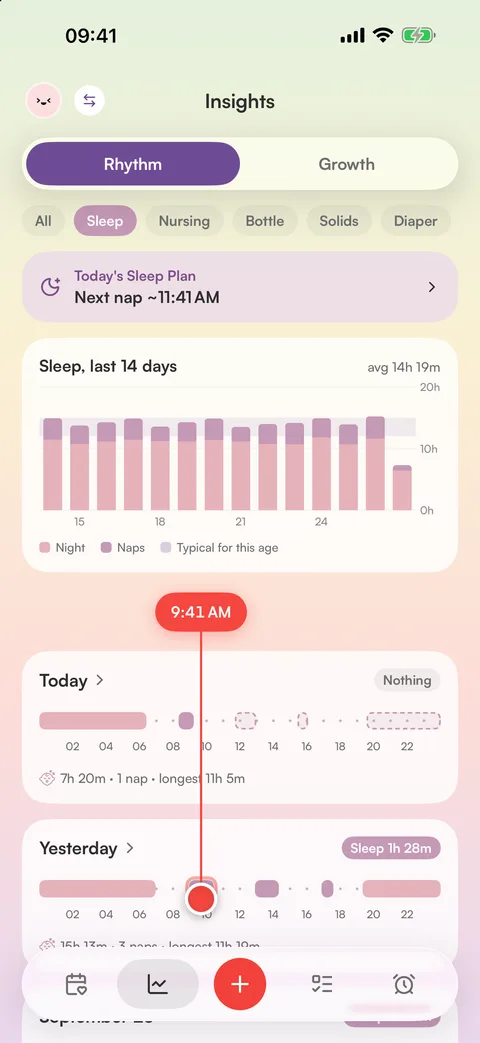
Rhythm insights are part of Plumi Pro. See each day on a 24-hour timeline, with sleep and feeds lined up across days. Filter by activity or check 14-day trends. How Sleep Forecast estimates the next nap
Naps and nights, totaled
Each sleep entry records its duration. Daily totals separate naps and night sleep. Filter to sleep and look back at recent days to compare them.
Start with a simple sleep log
For a newborn, start and stop a sleep timer, or enter the times later when your hands are free. The journal shows the duration of each sleep and daily totals alongside feeds and diapers. Free includes in-app timers and the latest month of journal history, without ads or an account.
With Pro, use sleep timers on Apple Watch, stop a Live Activity from your Lock Screen, or share a running timer with another caregiver once it syncs. Rhythm insights, Sleep Forecast and Sleep Plan also require Pro. Compare the plans.
Plumi records the sleep you log. It does not automatically detect sleep or monitor breathing. For babies under eight weeks, Sleep Forecast suggests following your baby’s cues instead of showing a countdown. Read how forecasts work.
Keep feeding and diapers in the same journal, or try the free sleep needs calculator for general age ranges.
Free logging, one Pro subscription for sharing
Logging is free, with no account needed. Plumi Pro adds sync, reminders and family sharing. One Pro subscription covers the people you invite, each with their own account. See how to share with a nanny or caregiver.
- Free baby logging
- No account for free logging
- End-to-end encrypted Pro sync
Sleep tracker questions
Is the sleep tracker free?
Yes. Logging naps and night sleep is free without an account. Plumi Pro adds Rhythm insights, Sleep Forecast, Sleep Plan, Lock Screen timers, sync and family sharing.
How do I track a nap without waking the baby?
One tap starts the timer, and with Plumi Pro it runs right on your Lock Screen and Dynamic Island. Glance down to see how long it’s been, and stop it without unlocking. You can also log a sleep after the fact with times that snap to “now” or “5 min ago.”
What is the rhythm view?
Every day becomes one line on a 24-hour timeline, with naps, night sleep and feeds each easy to spot. A single time line runs across all days, so you can see what usually happens at any hour, and a 14-day chart shows how the rhythm is changing. Rhythm is part of Plumi Pro; free users can explore it with an example baby.
How much sleep does my baby need?
It varies a lot by age. Newborns sleep 14–17 hours a day, one-year-olds closer to 11–14 including naps. Our free baby sleep calculator shows typical ranges by age, with an illustrative split between naps and night sleep. For your baby specifically, your pediatrician is the real guide.
Does it predict wake windows?
Yes. With Plumi Pro, Sleep Forecast shows your baby’s next nap window and bedtime as a range, starting from age-based wake windows and learning from your baby’s last 7 days of sleep. It’s guidance, not a schedule, so your baby’s cues still come first.
Can my partner see whether the baby is asleep right now?
With Pro sharing, your partner can see the running sleep timer once it syncs. One subscription covers the people you invite, each with their own account. Updates need an internet connection.
Does it work at night, offline, in airplane mode?
Yes. You can log offline, and Pro sync updates shared devices when you reconnect. Dark mode helps with logging at night.

See the rhythm. Plan the nap
Free forever for sleep, feeding and diapers. Plumi Pro adds Lock Screen timers, sync and sharing.