



An Apple Watch baby tracker for busy hands
Check recent care on Apple Watch for free. With Plumi Pro, time breastfeeding and sleep or log a diaper without reaching for your iPhone. Entries join the same baby journal on your paired phone.
See the last care, start the next timer
When you are holding your baby, a quick glance can answer when the last nursing session, nap or diaper was logged. Pro lets you record the next one from your wrist.
Plumi’s Watch app shows your baby, recent care and running timers. With Pro, start sleep or nursing timers, switch nursing sides, and see the next estimated nap or bedtime window when available. You can still stop a running timer after Pro access ends.
Everyday tracking on iPhone is free, works offline and has no ads. Pro adds Watch logging and optional encrypted family sharing.
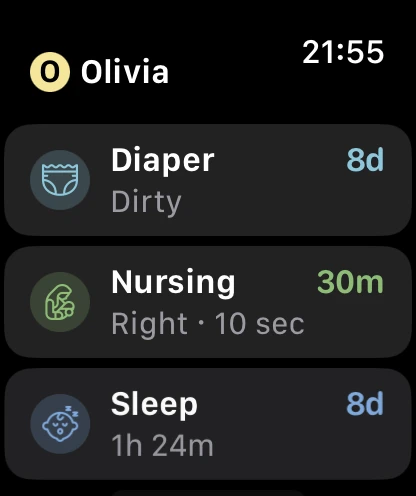
Actual Plumi Watch screen, with example records.
What you can log on Apple Watch
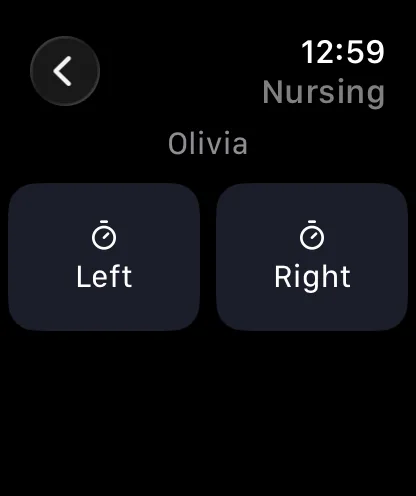
- Breastfeeding: time the left or right side, switch sides and finish the feed.
- Sleep: start a timer when your baby settles and stop it when they wake.
- Diapers: choose wet, dirty, mixed or clean.
- Other care: time tummy time, strolls, baths and play; use a screen-time timer or log potty and tooth brushing.
Adding logs and starting timers on Watch require Pro. Bottle amounts, pumping volumes, foods, growth measurements and health details are entered on iPhone. See the feeding tracker, sleep tracker and complete logging guide for those records.
For nursing, the Watch has separate left and right controls. On iPhone, the journal records the side, time and duration alongside bottle feeds and pumping.
Set up Plumi on your Watch
- Install Plumi on your iPhone and add your baby. Local iPhone logging needs no account.
- Install the Plumi companion app through the Watch app on your paired iPhone.
- Open Plumi on both devices. In Plumi’s iPhone Settings, open Apple Watch to check pairing, installation and connection.
- Try the recent-care view. For Watch logging and starting timers, sign in and enable Plumi Pro on iPhone, or use confirmed family Pro access.
The iPhone app requires iOS 17 or later, and the Watch app requires watchOS 11 or later. Pairing compatibility also depends on your iPhone and watchOS version. Check the current App Store requirements for your devices.
When the phone is unavailable
The Watch can queue entries and transfer them when the paired iPhone becomes available again, while Pro access permits logging. Pending entries are not yet in the phone’s journal or the shared family record. Open both apps and check the connection when you need to confirm a handover.
What is free, and what needs Pro?
Free: local tracking for one baby on iPhone, the latest month of journal history, growth charts, saved milestones, CSV export, optional iCloud backup and the Watch’s recent-care view. No ads or account required for local tracking.
Pro: Watch logging and starting timers, full journal history, multiple baby profiles, Sleep Forecast, Rhythm insights, reminders, Live Activities and encrypted sync and sharing.
US pricing is $29.99/year (about $2.50/month billed annually) or $4.99/month. Eligible new subscribers can try Pro free for 3 days. Subscriptions renew automatically unless cancelled. Your App Store shows local pricing and trial eligibility before purchase. See all plan details.
Looking for quick access on iPhone too? Since Last and Today widgets are free. For how records are stored, read Plumi’s privacy guide.
Apple Watch baby tracking questions
Does Plumi have an Apple Watch baby tracker?
Yes. Plumi has a companion Apple Watch app for a paired iPhone. View recent care for free. Plumi Pro adds logging, starting timers and the next estimated sleep window. The iPhone app requires iOS 17 or later; the Watch app requires watchOS 11 or later. Your iPhone must also support the watchOS version installed on your watch.
Can I track breastfeeding from Apple Watch?
Yes, with Plumi Pro. Start a nursing timer on the left or right, switch sides during the feed and end the session from your wrist. The record appears in the iPhone journal after it transfers. Nursing timers and manual nursing entries on iPhone are free.
Can I log bottles or pumping amounts on the Watch?
Enter bottle amounts, pumping volumes and solids on iPhone. The Watch supports nursing, sleep, tummy time, stroll, bath, play and screen-time timers, plus diaper, potty and tooth-brushing logs. Starting timers and adding logs on Watch require Pro.
Is the Apple Watch app free?
Viewing recent care is free. Plumi Pro adds new logs, starting timers and the next estimated sleep window. You can still stop a running timer after Pro access ends. See current Free and Pro plans before subscribing.
Does the Watch work when my iPhone is out of reach?
After setup, the Watch can keep pending logs until your paired iPhone becomes available again, subject to valid Pro access. A pending entry has not yet reached the iPhone journal or another caregiver. Open Plumi on both devices to check the connection and pending entries. This is a companion app; it needs the paired iPhone for setup and transfer.
Can my partner see what I log on Apple Watch?
With Pro family sharing, Watch entries transfer to your paired iPhone and then sync with the people you invited when connected. One subscription covers the invited family, up to five people per child including the owner. Photos and scanned documents are not shared. Read the family sharing guide for setup and roles.

Keep your baby’s log close at hand
Start free on iPhone and view recent care on your Watch. Add Pro for logging and starting timers from your wrist.