



 Feeding tracker
 A baby feeding tracker you can use with one hand
Log nursing, bottles, pumping and solids, then check daily totals. Plumi Pro adds Milk Stash, printable batch labels, Siri logging and a shared feeding log for your partner or caregiver.
- Breast, bottle & solids Record nursing sides and duration, bottles in ml or oz, pumping sessions and first foods.
- Logged with one hand Choose a recent food or a time such as Now or 5 min ago.
- Both parents, same log With Plumi Pro, check what your partner or caregiver logged before the next feed.
The feeding log that adds itself up
The journal adds up each nursing session, bottle and meal: for example, 8 nursing sessions, 230 ml from bottles, 3 solid meals. Filter to feeds and check when the last feed was logged.
Solids, logged in one tap
Choose a recent food to log it again, or select Now or 5 min ago for the time. The history shows which foods you offered and when.
From pumping to the next bottle
Plumi Pro keeps fridge and freezer totals beside your feeding log, oldest batches first. Pick where milk goes when you log pumping, and choose Fridge or Freezer when you log a bottle to deduct it. Print QR labels, then scan a bag to log its bottle.
Organize your breast milk stash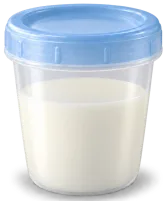 25 ml 13 minutes Use by Fri, Oct 9 60 ml 1 minute Use by Mon, Oct 12 60 ml 10h frozen Best by Apr 8 80 ml 8h frozen Best by Apr 8 20 ml 7h frozen Best by Apr 8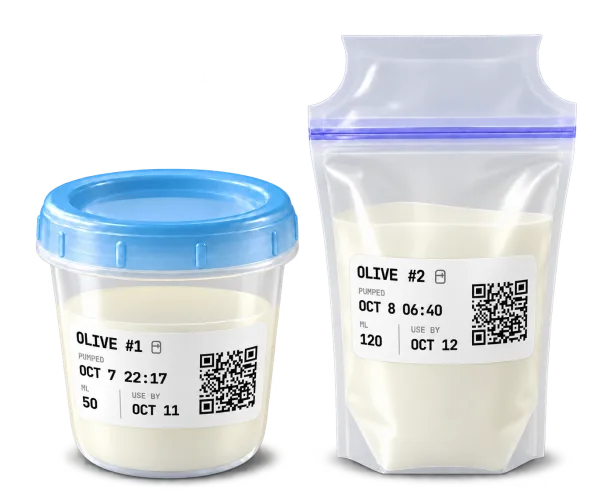
Log a feed when your hands are full
Say “Hey Siri, log bottle in Plumi” or ask Siri to start or stop a nursing timer. Siri asks for the bottle amount when needed, and you can ask about the last feed without opening Plumi. See example phrases in Settings → Siri.
Siri bottle logs record the feed. To deduct stored milk, log the bottle in the app and choose Fridge or Freezer as the stash source.
 Hands-free, from anywhere. Say Hey Siri, and Plumi logs without you opening the app. “Hey Siri, start sleep timer in Plumi” “Hey Siri, stop nursing in Plumi” “Hey Siri, log diaper in Plumi” Siri asks wet, dirty or mixed. “Hey Siri, log bottle in Plumi” Siri asks the amount. “Hey Siri, last feed in Plumi”
 Record foods and reactions
When it's safe to do so, record the food, symptoms and severity of a possible reaction. Keep the details on the Care tab and share the list with caregivers or your pediatrician. A log cannot diagnose an allergy. See the baby allergy tracker
How to track breastfeeding in Plumi
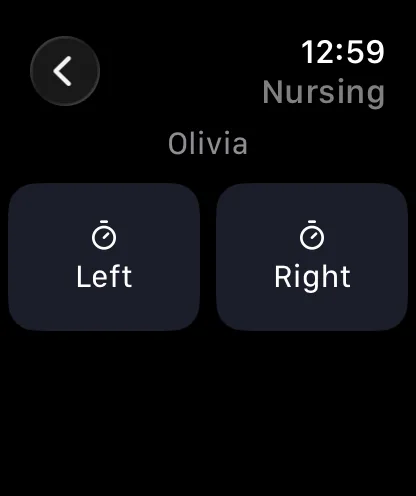
Open Nursing, choose left or right, and start the timer. Switch sides during the feed, or add the start, end and side afterward. Check the last nursing entry before the next feed and see the day’s nursing count and duration in the journal.
Nursing timers and manual entries on iPhone are free, work offline and need no account. Free shows the latest month of journal history. With Pro, you can use nursing timers on Apple Watch, keep a timer on your Lock Screen, and share feeds with your partner.
For mixed feeding, keep bottles and pumping alongside nursing. The journal records time and bottle amounts; it does not measure how much milk a baby takes directly at the breast.
Related guides: sleep tracking · diaper tracking · Free and Pro plans.
Free logging, one Pro subscription for sharing
Logging is free, with no account needed. Plumi Pro adds sync, reminders and family sharing. One Pro subscription covers the people you invite, each with their own account. See how to share with a nanny or caregiver.
- Free baby logging
- No account for free logging
- End-to-end encrypted Pro sync
Feeding tracker questions
Is the feeding tracker free?
Yes. Logging feeds, nursing, bottle, solids and pumping, is free forever, with no account needed to start. Plumi Pro adds Milk Stash with printable batch labels, Siri logging, sync across devices, sharing with your partner or caregivers, and feeding reminders.
Can I track milk in the fridge and freezer?
Yes. Milk Stash is part of Plumi Pro. Track fridge and freezer batches, add stored milk when logging pumping, and select Fridge or Freezer under “From the stash” when logging a bottle to deduct that amount. Batches appear oldest first. You can also add existing milk, correct the count and print QR batch labels on A4 sticker sheets or plain paper.
What happens when I scan a milk label?
With Plumi Pro, scanning the QR code opens the bottle form for that bag and baby, with breast milk, the storage location and the bag’s current remaining amount selected. Confirm the amount you fed and save the bottle to deduct it from that bag. The bag must be available on the scanning device; an empty, deleted or not-yet-synced bag shows “Bag not found”.
Can I log a bottle or start a nursing timer with Siri?
Yes, with Plumi Pro. Say “Hey Siri, log bottle in Plumi” or “Hey Siri, start nursing in Plumi”. Siri asks for any details it needs, such as the bottle amount. You can also stop timers or ask about the last feed. Find example phrases in Settings → Siri. Siri bottle logging does not deduct milk from your stash; choose the stash source in the app when using stored milk.
How do I track breastfeeding, and which side I nursed last?
Start a nursing timer or add the entry afterward. The last nursing entry shows the side and duration. Lock Screen timers are available with Plumi Pro.
Can I log bottles in ounces instead of milliliters?
Yes. Bottles show in ml or oz, according to your unit preference.
How much should my baby be drinking?
A common guide for formula-fed babies under 6 months is about 150 ml per kilo of body weight per day, but every baby is different. Ask your pediatrician about yours. Our free baby feeding calculator gives you a starting point based on weight.
Does it help with starting solids and allergies?
You can log foods, choose recent foods again, and record the symptoms and severity of a possible reaction. Share the saved list with your pediatrician or caregivers. A log cannot diagnose an allergy.
Can my partner or the nanny see the feeds?
Yes. With Plumi Pro, invite your partner or caregiver to the shared log. Every entry shows who logged it, and updates sync when connected. One subscription covers the people you invite. See how family sharing works.
Does it work offline, at 3 a.m., in airplane mode?
Yes. You can log offline. With Pro sync enabled, entries reach shared devices when you reconnect.
Can I remind myself to feed?
With Plumi Pro, set a reminder at a fixed time or for an interval after the last logged feed. Follow your care team’s feeding advice.

Keep feeds in one log
Free forever for feeding, sleep and diapers. Plumi Pro adds Milk Stash, printable labels, Siri logging, sync and sharing.